

How to Optimize Gaming Mouse Settings

A gaming mouse is more than just a peripheral; it’s an extension of your hand and a crucial tool for precision, speed, and overall gaming performance. Whether you’re a competitive esports player, a casual gamer, or a PC enthusiast, optimizing your gaming mouse settings can drastically improve your experience. The right settings allow you to hit targets faster, reduce hand fatigue, and maximize comfort during long sessions. In this guide, we’ll break down key tips, techniques, and features to help you optimize your gaming mouse for peak performance.
Why Optimizing Your Gaming Mouse Matters
Many gamers underestimate the impact of proper mouse settings on gameplay. A high-end mouse with adjustable DPI, customizable buttons, and ergonomic design will only perform optimally if configured correctly. Optimized settings can improve reaction time, accuracy, and consistency, giving you a competitive edge in fast-paced games and a more comfortable experience during marathon sessions.
Related read: how to open gaming mouse cyberpowerpc
Key Features to Focus On When Optimizing Your Mouse
1. DPI and Sensitivity Settings
DPI, or dots per inch, determines how far your cursor moves relative to your mouse movement. Higher DPI allows faster cursor movement, while lower DPI provides finer precision.
- Low DPI (400–800): Ideal for first-person shooters where precision aiming is crucial.
- Medium DPI (800–1600): Suitable for general gaming, strategy games, and everyday use.
- High DPI (1600+): Useful for fast-paced action games or multi-monitor setups.
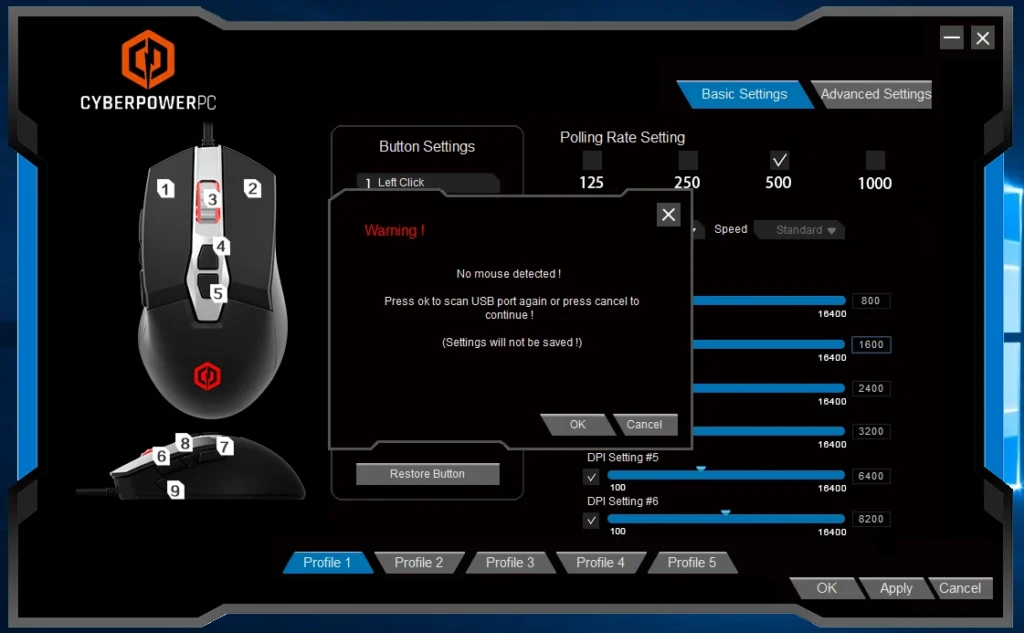
Most gaming mice allow on-the-fly DPI adjustments, so you can switch sensitivity depending on the game or in-game situation. Additionally, many mice feature software to customize DPI per profile, giving you complete control over precision.
2. Polling Rate
The polling rate, measured in Hz, defines how often your mouse reports its position to the PC. A higher polling rate reduces lag and improves responsiveness.
- 125 Hz: Standard, sufficient for casual gaming.
- 500–1000 Hz: Recommended for competitive gaming, ensuring minimal input delay.
For fast-paced competitive titles, a higher polling rate can be the difference between landing a headshot and missing a target.
3. Customizable Buttons
Modern gaming mice often feature programmable buttons. Assigning functions or macros to extra buttons can streamline actions, reduce keypresses, and provide faster access to in-game abilities.
For MMO or MOBA players, mapping frequently used commands to side buttons increases efficiency. FPS players may use additional buttons for grenade throws, weapon switching, or crouching, allowing uninterrupted focus on aiming.
4. Ergonomics and Grip Style
The physical design of your gaming mouse plays a crucial role in comfort and precision. Ergonomic mice reduce hand fatigue during long sessions and allow better control over movements.
Grip styles to consider:
- Palm Grip: Your whole hand rests on the mouse; suitable for larger mice and long sessions.
- Claw Grip: Fingertips control movement, providing quick, precise actions.
- Fingertip Grip: Only fingertips touch the mouse, ideal for fast swipes and rapid movement.
Choosing a mouse that fits your grip style and hand size ensures maximum comfort and performance.
5. Surface Calibration
Gaming mice use optical or laser sensors to track movement. Many advanced mice allow surface calibration, which adjusts the sensor for your mousepad or desk surface. Proper calibration ensures accurate tracking, eliminates jitter, and prevents skipped movements, giving you a consistent experience across different setups.
6. Lift-Off Distance
Lift-off distance is the height at which the sensor stops tracking when the mouse is lifted from the surface. Low lift-off distances are preferable for gamers who lift their mouse frequently to reposition, ensuring smoother, more predictable movement. Many gaming mice allow users to adjust settings through their software for optimal control.
Wired vs Wireless Gaming Mouse
Gamers often wonder whether to choose a wired or wireless mouse. Both options have benefits depending on your gaming style and setup.
- Wired Mouse: Offers consistent connection, zero latency, and generally lower price. Ideal for competitive FPS or fast-paced games.
- Wireless Mouse: Provides freedom of movement, reduces cable clutter, and modern low-latency models are competitive with wired options. Best for multitasking setups, streaming, or casual gaming.
Related read: Is wired or wireless mouse better for gaming
Optimizing Mouse Settings in Software
Most modern gaming mice come with dedicated software that lets you fine-tune settings such as DPI, polling rate, button assignments, macros, lighting, and profiles. Some tips for software optimization:
- Create Game-Specific Profiles: Adjust sensitivity, button mappings, and macros for each game.
- Adjust Acceleration Settings: Disable mouse acceleration for consistent movement. Acceleration can interfere with precision aiming in competitive games.
- Enable Angle Snapping if Needed: Some software allows slight cursor correction for smoother lines, useful in design applications but often disabled in FPS gaming.
- Test Changes Gradually: Make small adjustments and test in-game to find your optimal setup.
Desk Setup and Comfort
Optimizing your mouse is not only about hardware and software but also your gaming environment. Consider:
- Mousepad Size and Texture: Larger mousepads allow for lower DPI movements without running off the edge. Smooth surfaces benefit low-DPI gamers, while textured pads enhance grip.
- Desk Height and Chair Position: Ergonomically align your setup to reduce wrist strain.
- Cable Management (for Wired Mice): Avoid drag and interference by keeping cables neatly routed or using a mouse bungee.
A well-organized and comfortable setup enhances performance and reduces fatigue.
Advanced Tips for Competitive Gamers
- Regular Sensor Cleaning: Dust or debris under the sensor can affect accuracy. Clean the sensor and mousepad regularly.
- Consistent Sensitivity: Use the same DPI and in-game sensitivity across games to develop muscle memory.
- Weight Adjustment: Some gaming mice offer removable weights. Find a weight balance that complements your grip style.
- Firmware Updates: Keep your mouse firmware updated for optimal performance and new features.
FAQs
How do I find the best DPI for my gaming style?
Start with medium DPI (800–1600) and adjust gradually based on accuracy and comfort. FPS players often prefer lower DPI for precise aiming, while RTS or fast-paced games may benefit from higher DPI.
Does mouse acceleration affect gaming performance?
Yes, mouse acceleration changes cursor movement unpredictably. Disabling it ensures consistent, repeatable movements, crucial for competitive gaming.
Can wireless mice match the performance of wired ones?
Modern wireless gaming mice with low-latency technology offer performance comparable to wired models, even in competitive settings.
Should I prioritize comfort over speed?
Both matter; Comfort ensures long-term play without fatigue, while speed and precision enhance in-game performance. Choose a mouse that balances both.
Do gaming mice require software for optimization?
Yes, software allows fine-tuning DPI, button assignments, macros, polling rate, and profiles. Some mice also enable surface calibration and lift-off distance adjustments.